 Buddy Guide
Asking
Ask the way you would ask a friend sitting next to you. Buddy sees the screen when you ask, so this, that line and here all work.
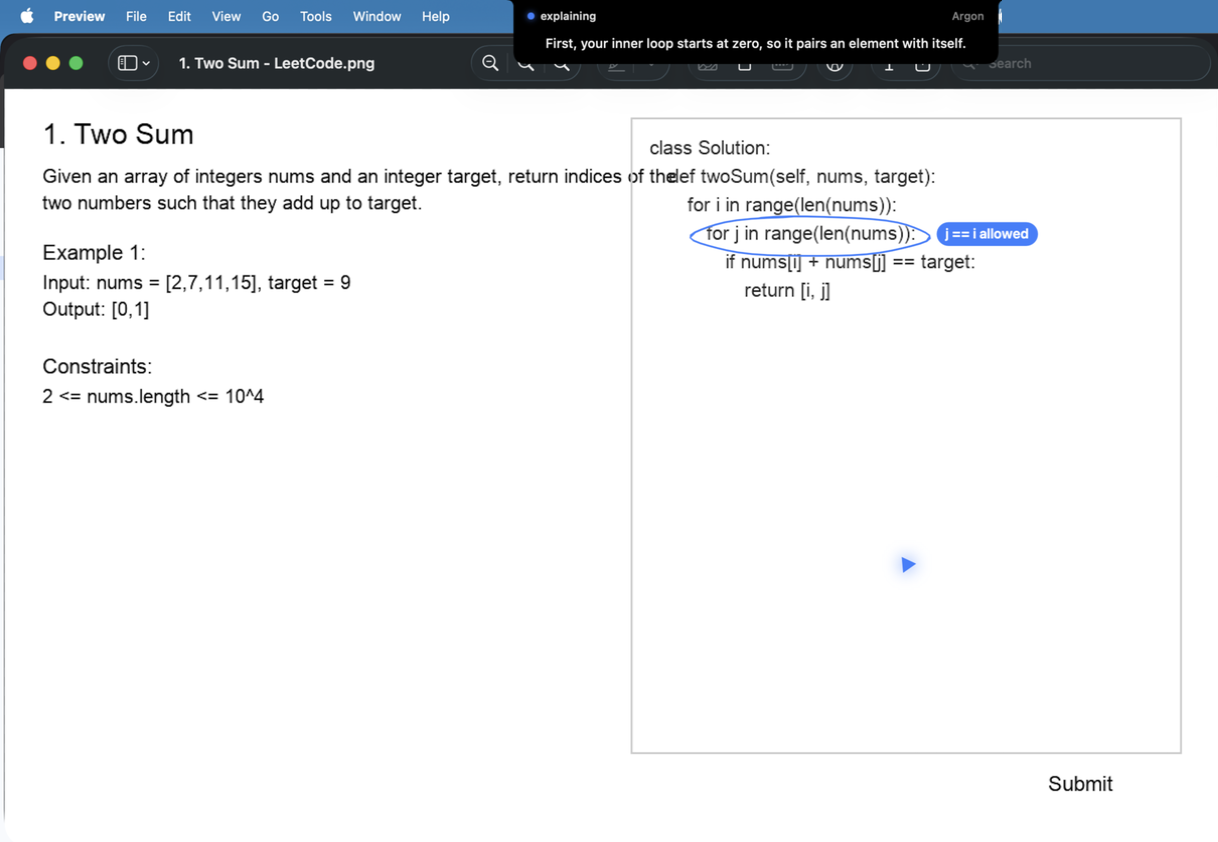
Hold ⌃ ⌥, ask, let go. If it heard you wrong, the words under the notch show it before anything is sent. The answer starts within a few seconds, each sentence spoken with the marks that go with it.
Press ⌃ ⌥ T, or open the notch and click the chat box. ⇧ Return adds a line, Esc puts the box away and keeps what you typed. Up to 2,000 characters, enough for a pasted function or error.
Point at what you mean. Select some text before you ask, or rest the pointer on a line for a moment while you hold the keys, and that is what this means.
Reading the notch
When idle, the notch disappears into the camera housing. When Buddy is busy, it widens: what Buddy is doing on the left, what it is about on the right.
Grey. Ready for a question.
Red. Hearing you while you hold the keys.
Amber. Looking at the screen and working out the answer.
Blue. Talking and drawing. The mic means you can talk over it.
Green. Waiting for you to do a step in an app.
Amber words. Something needs you. Hover, and the fix is there.
Good questions
Ask about what is on screen, in your own words. Buddy fits the answer to the question: a sentence for a quick one, a drawn lesson for a big one.
why does this crash on the last elementRings the line and walks through the failing case
teach me how consistent hashing works properlyBuilds a lesson on a card, step by step
should I use Kafka or a queue hereGives the verdict first, then the reason
I didn't get thatExplains again from a completely different angle
what's a trieAnswers in a sentence or two
how do I export this as a PDFPoints at the first step, then guides you through the rest
Talking over it
While Buddy explains, say its name and speak, with no keys. It stops, and the notch says Buddy paused with your words. Without the name it carries on, so talking to someone in the room, or a video playing, never interrupts it. Asking a new question with the keys also stops it.
Replay in the open notch plays the last answer again, voice and drawing, with no new request and nothing spent. Buddy listens like this only while an answer plays, and the mic beside explaining in the notch shows it; ending the answer with Esc or Stop closes the microphone. With AirPods or another Bluetooth headset as the microphone, it listens through your Mac's own microphone instead, so the headset keeps sounding right; on a Mac with no microphone of its own it does not listen this way.
The open notch
Hover the notch to open it. Moving away closes it, and the app you were in stays in front.
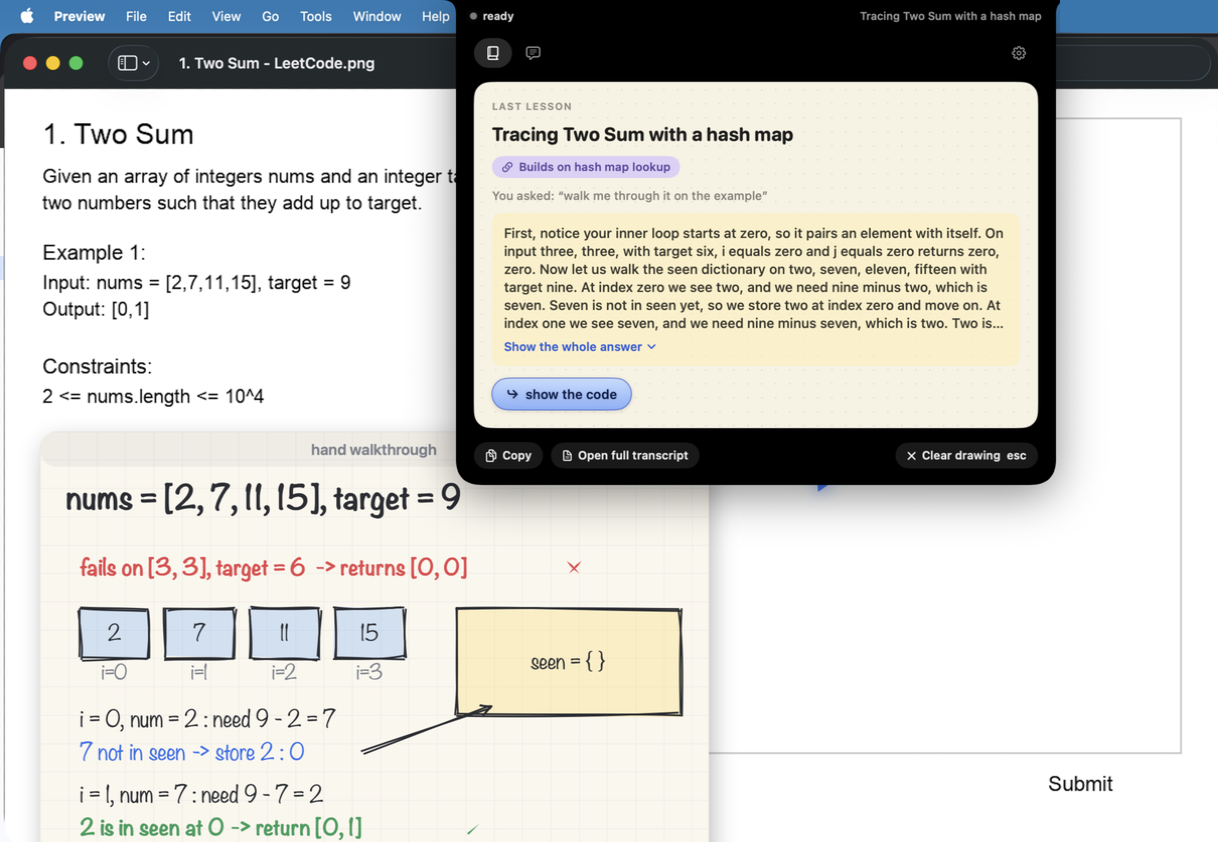
The last lesson as a paper card: its name, what it builds on, your question, the answer, and what to ask next. Replay, Open in Notebook and Copy sit beside it.
The whole day's conversation, spoken and typed, with Copy all. Each answer shows its time and which model answered.
Every lesson you have had, and the map of what you know. Each opens in its own window.
The gear. At most one alert shows above the lesson: a missing permission, a key problem, or a new version.
The board: learn something from scratch
Say teach me TCP from scratch or explain Raft on a whiteboard and the screen turns into paper. Buddy teaches the topic on it part by part, over as many questions as you like.
The notch says On the board the whole time, and a card lists the day's parts. Ask anything and it is answered on the board, adding to what is there. Esc stops a sentence, then leaves. done or Leave board also leave, and the whole board is kept in the Notebook as one page.
Teach it back
Explaining something is how you find out whether you understand it. Say let me explain consistent hashing back to you, check my understanding of binary search, or just teach it back after a lesson.
Take your time. A red meter shows Buddy is listening. Finish with I'm done, Return, or eight quiet seconds.
Buddy draws only what you said, the way you said it, wrong parts included. Nothing is added for you.
At most four, dashed so colour is never the only sign: a part left out, a link missing, or a ring with the correction beside it.
Try again changes only the part you talk about. Fill the gaps has Buddy explain just those. Esc or Cancel throws it away.
What you got right counts as remembered and what you missed fades sooner on the map. The board is kept in the Notebook as one page.
Practice problems: hints before answers
On LeetCode, HackerRank, NeetCode and similar sites, Buddy helps in steps, so you still get to solve it. Say I'm stuck and it starts at the bottom.
Ask for another hint to go up a step, or show me the code to go straight to the top. A question about a concept on the page, like what's a heap, is answered normally without giving the problem away. Your step on each problem is remembered for two days.
Lectures
Watching a video lecture? Just ask, what did she mean by idempotent? There is nothing to switch on. Buddy knows what was said in the minute before.
From the page's own transcript or YouTube's captions, matched to the playback time.
Where there is no transcript, and only after you allow System Audio Recording, that app's sound is turned into words on your Mac as it plays and filed by the video's time, in memory only, so pausing or rewinding still works. The lecturer on your speakers is never taken for you.
Not the microphone, not meetings or calls, not music apps. The notch shows a small screen glyph whenever sound is being kept.
Getting through any app, step by step
Ask how to do something in the app in front of you, like where do I turn on dark mode. Buddy says one step and points at the exact button. Do it, and it notices and says the next one, until the task is done.
Between steps Buddy compares a tiny thumbnail of the screen on your Mac, and only asks again once the screen has changed. Going the wrong way? The next step says how to get back. Esc stops it.
A finished walkthrough is kept. Ask for the same task again in that app, in any words, and it replays with no model at all, only the voice. The notch shows from memory.
Errors on screen
When an error appears in a terminal, an editor or a judge's page, a soft red glow shows under the notch. Hover it and pick Explain this error, or tap ⌃ ⌥. Buddy rings the line it points to.
Nothing is sent anywhere until you ask. Not now lets it go, and the same error is never offered twice.
Reviewing your own work
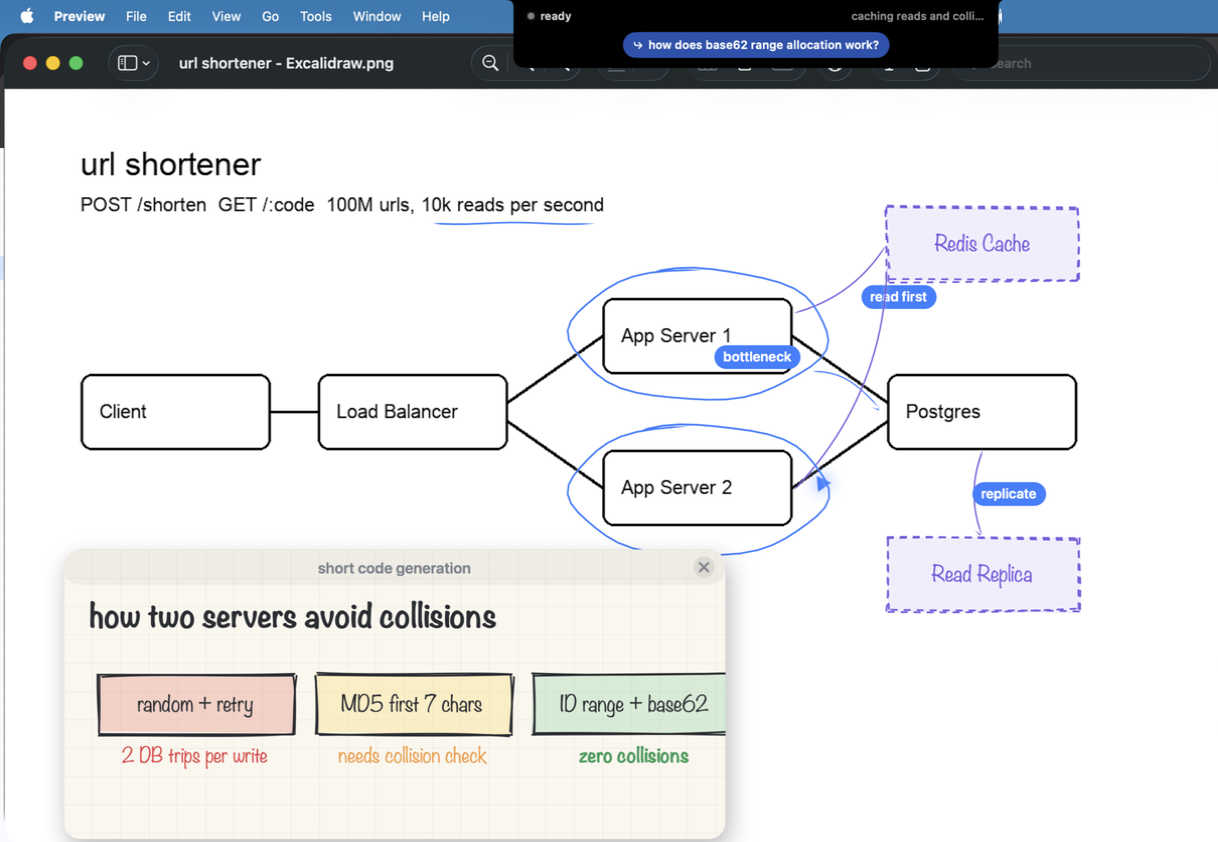
Drawing a design in Excalidraw, draw.io, Miro, Freeform or any whiteboard app? Ask what am I missing? Buddy talks it through like a peer at the whiteboard: it marks your own boxes and sketches anything it would add as a dashed purple box beside where it belongs. It never scores the design.
The notebook
Every finished lesson becomes a page: its drawing, what was said, and links to teach it back or ask a follow-up. Open Notebook from the open notch.
Lessons down the side, grouped by day. Search finds one by name, question or words.
This page, this day, a range or everything, laid out like a printed notebook. It runs in the background and a notification opens it.
Kept on your Mac. More turns off keeping new lessons, or deletes a page, a day or every note, asking first.
Memory and the map
Buddy remembers the ideas it explains, across days. When a new question touches one, the answer builds on it, like the same trade-off as the consistent hashing from Tuesday, and the lesson shows Builds on with its name. If an explanation did not land, the next one uses a different example.
The map of what you know
Open Map from the notch. Every idea you have been taught, joined to the ideas it relates to, grouped by topic and coloured by how well you still remember it.
Click an idea to see how it was last explained and the lessons it came from, then pick Quick recap or Teach it back. Memory stays on your Mac; Forget everything is in Settings.
Settings
Hover the notch and open the gear. Eight controls in four groups, with How to use Buddy (this page) and Quit Buddy under them.
Talking
- Sounds
- Soft tones when the mic opens and a question is sent.
- Open at login
- Whether Buddy starts when you log in.
Memory
- Remember what I learn
- On or off, with how many ideas and how-tos are kept.
- Open Map, Forget everything
- The map of what you know. Forgetting asks first.
Answers
- Answers from
- Auto picks Sonnet, Opus or Gemini per question, or always use one.
- Spent today
- What Buddy spent on your keys today, and this month. Hover it to see Claude, Gemini and Deepgram, and what each paid for.
- Name and keys
- Reopens setup on the keys.
Buddy
- Updates
- Checked once a day. Update appears when there is a newer version.
What it costs
Buddy is free. It runs on your own API keys, so you pay the providers directly, and Spent today in Settings shows the running total.
Shortcuts
| Hold ⌃ ⌥ | Ask out loud |
| ⌃ ⌥ T | Type a question |
| Return / ⇧ Return | In the chat box: send, or a new line |
| Esc | Clear the drawing, stop a walkthrough, leave the board, or put the chat box away |
| ⌘ 1 / ⌘ 2 / ⌘ , | In the open notch: Lesson, Chat, Settings |
| Tap ⌃ ⌥ while the notch glows red | Explain the error on screen |
| ↑ ↓ Space | In the Notebook: move through pages, replay the last lesson |